

PR Exclusion
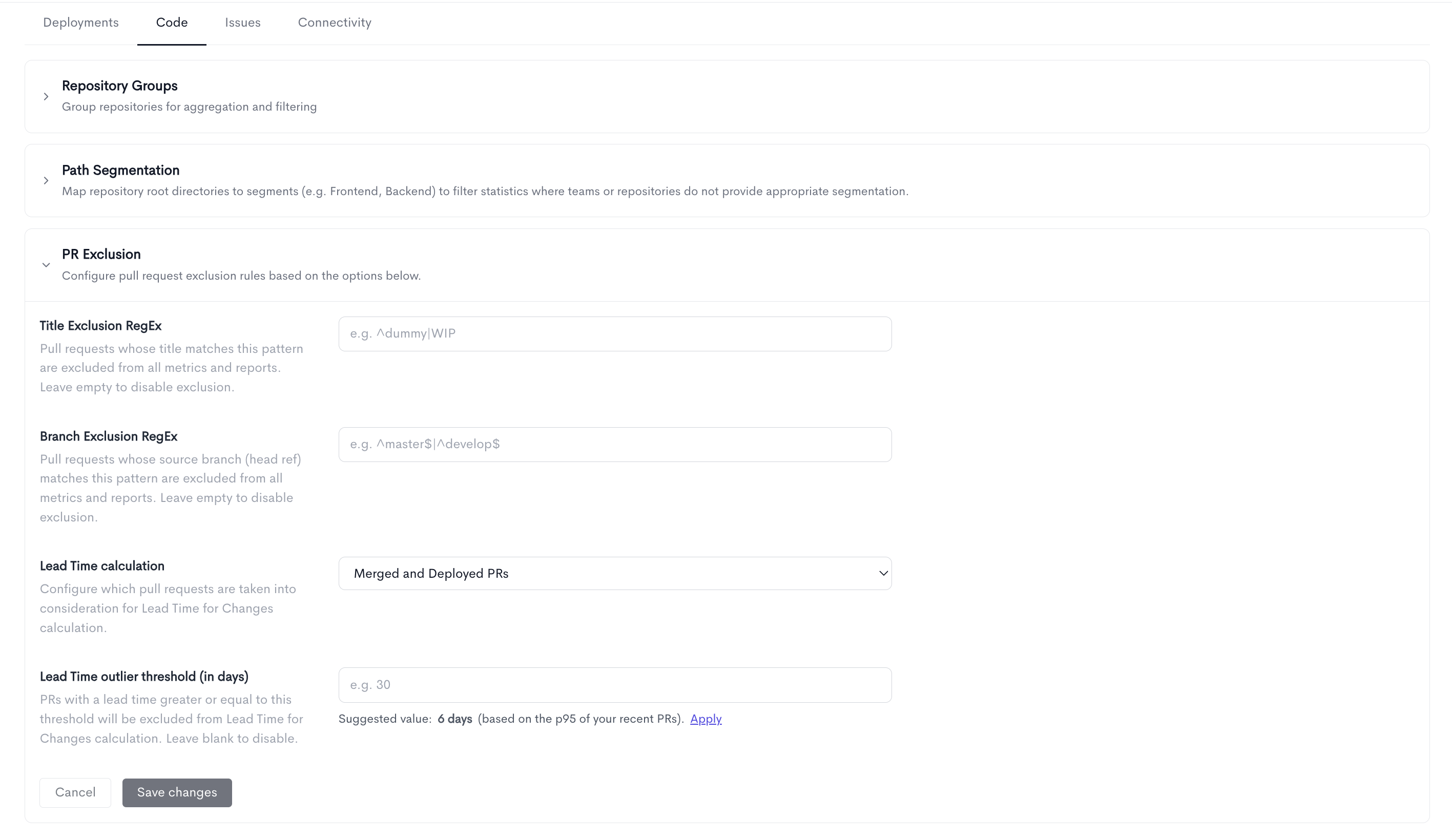
The PR Exclusion tab allows you to exclude pull requests from all metrics and reports, and configure how Lead Time for Changes is calculated.
The following fields can be configured:
- Exclusion regex - A regular expression pattern used to match pull request titles. Any pull request whose title matches this pattern will be excluded from all metrics and reports (e.g.
^dummy|WIP). Leave the field empty to disable exclusion. - Lead Time calculation - Configures which pull requests are taken into consideration for the Lead Time for Changes calculation. Choose between:
- Lead Time outlier threshold - set a maximum lead time (in days) at the account level. Any PR that takes longer than that is automatically left out of your Lead Time for Changes calculations. We even suggest a threshold based on your own recent data.
- Ignore individual pull requests - mark a single PR (a test PR, a workflow bypass, a one-off hotfix, etc.) as "ignored" directly from its detail view. Ignored PRs are removed from Lead Time, Cycle Time, and DORA metrics, and are clearly flagged everywhere they appear.
The result: metrics that reflect your normal delivery flow instead of being skewed by a handful of extreme outliers.
1. Lead Time outlier threshold
What it does
A single stalled or forgotten PR can take weeks or months to merge/deploy and drag your average Lead Time way up. The outlier threshold lets you say "ignore anything that took longer than N days" so your Lead Time for Changes reflects typical work.
- Applies only to the Lead Time for Changes metric (its value, chart, heatmap, and the underlying PR list).
- Works with both lead-time calculation modes - Deployed (first commit → deploy) and Merged (open → merge → deploy).
- Set once, at the account level - it applies for everyone.
How to set it
- Go to Settings → Detection → PR Exclusion.
- Find Lead Time outlier threshold (in days).
- Enter the number of days. Any PR with a lead time greater than or equal to this value is excluded from Lead Time for Changes.
- Click Save.
- To turn it off again, clear the field and Save. (Blank = no threshold, all PRs counted.)
Suggested value
Under the input you'll see a suggestion, e.g. "Suggested value: 30 days (based on the p95 of your recent PRs)."
- This is the 95th percentile of your lead times over the last 90 days - meaning ~95% of your recent PRs fall under it, so it trims only the extreme tail.
- Click Apply to drop the suggested number straight into the field, then Save.
Tip: The threshold changes what a metric value means, so use it deliberately. A good starting point is the suggested p95 value; lower it if you want a stricter definition of "normal."
2. Ignore individual pull requests
Sometimes a specific PR just should not count, such as a test/dummy PR, something that bypassed your normal review flow, or an emergency hotfix. You can now exclude that one PR from metrics without touching any regex or global settings.
Ignored PRs are removed from:
- Lead Time
- Cycle Time
- DORA metrics
They are not deleted. They still exist and can be restored at any time.
How to ignore a PR
- Open the PR's detail panel (for example, click a PR title in Delivery > PR Insights).
- At the top you will see an Include in metrics card. Click Ignore pull request.
- Choose a reason:
- Test / Dummy Pull Request
- Bypassed standard workflow
- Hotfix / Emergency deploy
- Other (type your own note)
- Confirm with Ignore Pull Request.
The reason is saved along with the name of the person who ignored it (for example, Hotfix / Emergency deploy (by Jane Doe)), so there is a clear audit trail.
How to restore a PR
Open the same PR. The card now reads This pull request is ignored with its reason. Click Restore to metrics and it is counted again immediately (no reason needed).
How to spot ignored PRs
- PR Insights timeline - each PR title shows a small eye icon: a green eye means included, a red eye-off means ignored.
- PR Insights filters - there is a new Excluded state filter so you can list all ignored PRs in one place.
- PR detail panel - a red card at the top states the PR is ignored and shows the reason.
Threshold vs. Ignore: which one?
| Outlier threshold | Ignore a PR | |
|---|---|---|
| Scope | Whole account, automatic | One specific PR, manual |
| Rule | Anything >= N days | This exact PR |
| Affects | Lead Time for Changes only | Lead Time, Cycle Time, and DORA metrics |
| Best for | Trimming the extreme tail of slow PRs | Test PRs, hotfixes, workflow exceptions |
| Reversible | Clear the field | Click Restore to metrics |
Use both together: the threshold handles the general long-tail automatically, while ignore handles the specific PRs you know should not count.
Updated about 2 months ago