

AI Checkpoints
AI Checkpoints
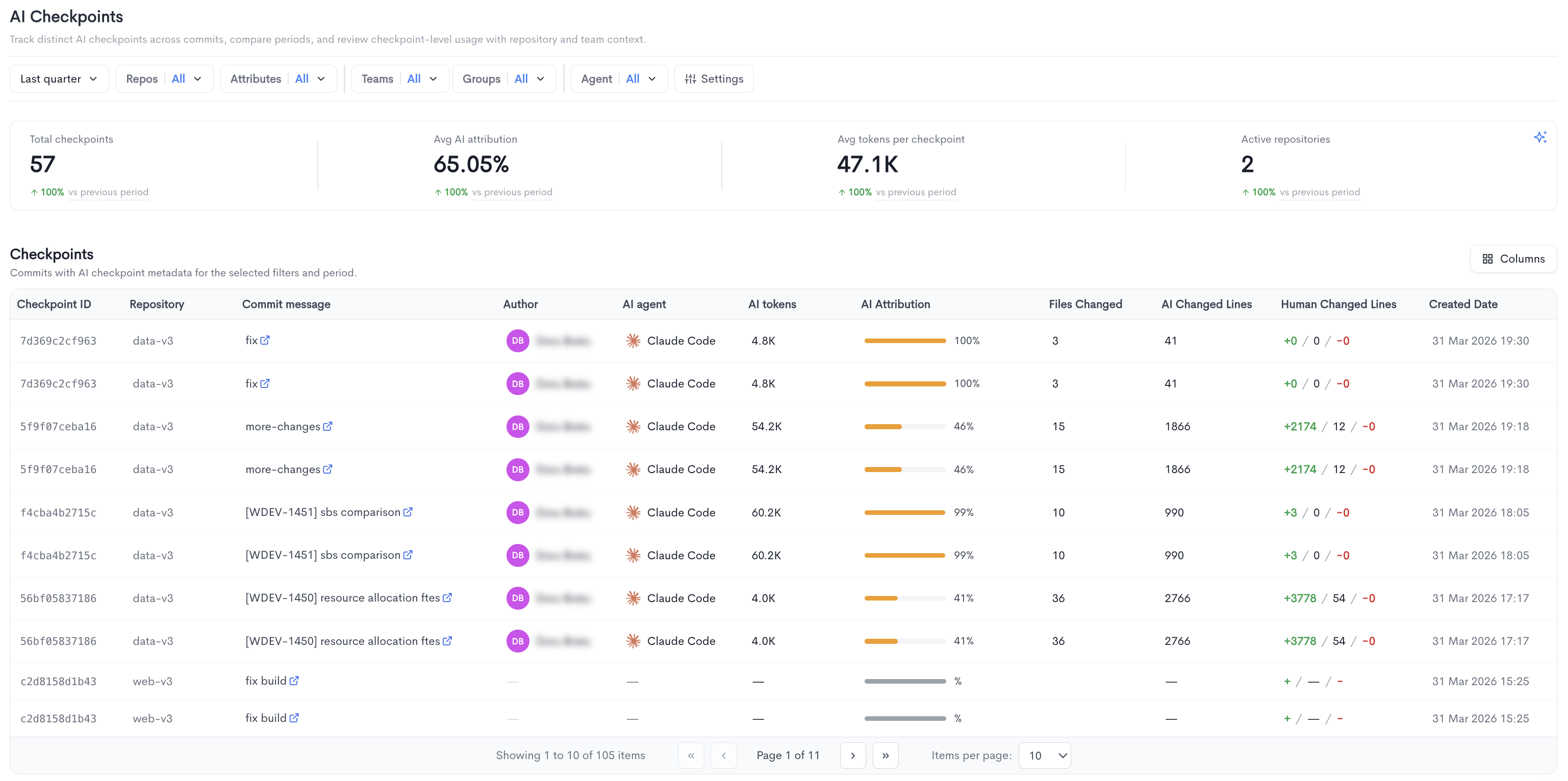
The AI Checkpoints report lets you track distinct AI checkpoints across commits, compare periods, and review checkpoint-level usage with repository and team context. It is accessible under AI Impact in the left sidebar.
A checkpoint captures an AI coding session in full. As an AI agent runs — whether Claude Code, Cursor, Copilot, etc. — the session is recorded in the background. When the developer runs
git commit, a permanent checkpoint is created and its ID is attached to the commit as a trailer (Entire-Checkpoint: ...). Session data is stored in theentire/checkpoints/v1branch and pushed alongside the code, keeping a complete, auditable record of every AI-assisted change.
The top of the page displays four summary metrics:
- Total checkpoints - The total number of AI checkpoints recorded in the selected period.
- Avg AI attribution - The average percentage of code attributed to AI across all checkpoints.
- Avg tokens per checkpoint - The average number of tokens consumed per checkpoint.
- Active repositories - The number of repositories with AI checkpoint activity.
Each metric also shows a percentage change compared to the previous period.
Checkpoints - A paginated table listing all commits with AI checkpoint metadata for the selected filters and period, with the following columns:
- Checkpoint ID - The unique identifier of the checkpoint, linked to the commit.
- Repository - The repository where the commit was made.
- Commit message - The commit message, linked to the commit in the source provider.
- Author - The developer who made the commit.
- AI agent - The AI tool used for the checkpoint (e.g. Claude Code).
- AI tokens - The number of tokens consumed for this checkpoint.
- AI Attribution - The percentage of the commit attributed to AI, shown as a progress bar and percentage.
- Files Changed - The number of files modified in the commit.
- AI Changed Lines - The number of lines changed by AI.
- Human Changed Lines - The number of lines added, unchanged, or removed by the developer, shown as additions, modifications, and deletions.
- Created Date - The date and time the checkpoint was created.
Filters available at the top of the report include date range, Repos, Attributes, Teams, Groups, Agent, and Settings.
AI session tracking for Git workflows
See Entire Integration for AI session tracking and AI Checkpoints.
Updated 3 days ago