

AI Checkpoints
AI Checkpoints
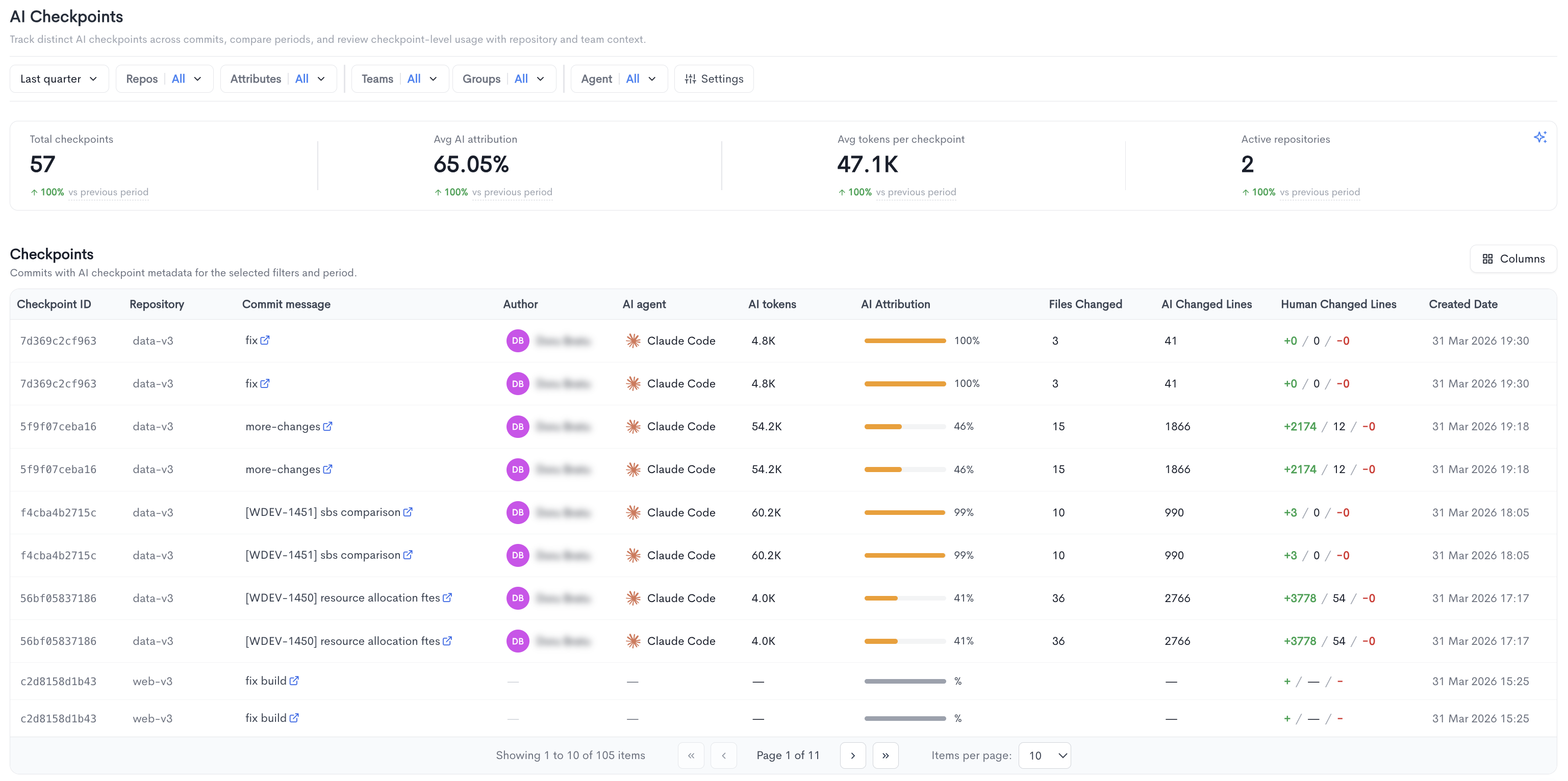
The AI Checkpoints report lets you track distinct AI checkpoints across commits, compare periods, and review checkpoint-level usage with repository and team context. It is accessible under AI Impact in the left sidebar.
A checkpoint captures an AI coding session in full. As an AI agent runs — whether Claude Code, Cursor, Copilot, etc. — the session is recorded in the background. When the developer runs
git commit, a permanent checkpoint is created and its ID is attached to the commit as a trailer (Entire-Checkpoint: ...). Session data is stored in theentire/checkpoints/v1branch and pushed alongside the code, keeping a complete, auditable record of every AI-assisted change.
The top of the page displays four summary metrics:
- Total checkpoints - The total number of AI checkpoints recorded in the selected period.
- Avg AI attribution - The average percentage of code attributed to AI across all checkpoints.
- Avg tokens per checkpoint - The average number of tokens consumed per checkpoint.
- Active repositories - The number of repositories with AI checkpoint activity.
Each metric also shows a percentage change compared to the previous period.
Checkpoints - A paginated table listing all commits with AI checkpoint metadata for the selected filters and period, with the following columns:
- Checkpoint ID - The unique identifier of the checkpoint, linked to the commit.
- Repository - The repository where the commit was made.
- Commit message - The commit message, linked to the commit in the source provider.
- Author - The developer who made the commit.
- AI agent - The AI tool used for the checkpoint (e.g. Claude Code).
- AI tokens - The number of tokens consumed for this checkpoint.
- AI Attribution - The percentage of the commit attributed to AI, shown as a progress bar and percentage.
- Files Changed - The number of files modified in the commit.
- AI Changed Lines - The number of lines changed by AI.
- Human Changed Lines - The number of lines added, unchanged, or removed by the developer, shown as additions, modifications, and deletions.
- Created Date - The date and time the checkpoint was created.
Filters available at the top of the report include date range, Repos, Attributes, Teams, Groups, Agent, and Settings.
1. Entire Setup
1.1 What is Entire?
Entire (https://docs.entire.io/introduction) integrates with your Git workflow to capture AI agent sessions during development. These sessions are indexed alongside commits, enabling:
- Traceability of code generation
- Searchable history of AI-assisted development
- Better auditability of changes
1.2 Installation
You can install Entire using one of the following methods:
Option A: Shell Script
curl -fsSL https://entire.io/install.sh | bashOption B: Homebrew
brew tap entireio/tap && brew install entireio/tap/entire1.3 Enable Entire for a Repository
To enable Entire in a dedicated repository:
entire enable --local --skip-push-sessions --telemetry=false1.4 Configuration Verification
After enabling, verify the configuration files inside the .entire directory.
File: .entire/settings.json
{
  "enabled": false
}
File: .entire/settings.local.json
{
    "enabled": true,
    "strategy_options": {
        "push_sessions": false
    },
    "telemetry": false,
    "commit_linking": "always"
}
Notes:
enabled: trueinsettings.local.jsonensures local activationpush_sessions: falseprevents session data from being pushed remotelytelemetry: falsedisables analytics collectioncommit_linking: alwaysensures sessions are always tied to commits
1.5 Check Current Status
To verify that Entire is running correctly:
entire status2. Waydev Commit Hook Setup
2.1 Purpose
The Waydev hook enables tracking of commits and developer activity for analytics and reporting.
2.2 Setup Steps
Step 1: Add Hook File
Copy the wd_commit_hook and post-commit files into your Git hooks folder.
If you already have a post-commit file, append the content of the downloaded post-commit file to it.
You can download the file here(zip archive containing wd_commit_hook & post-commit files).
Step 2: Configure Git Hooks Path
Run the following command to enable the custom hook:
git config core.hooksPath .githooks Your git hooks folder could be in
.git/hooksinstead.
3. Validation Checklist
Ensure the setup is correct by verifying the following:
- Entire is installed:
entire --version - Repository is enabled:
entire status .entire/settings.local.jsoncontains the correct configuration.githooks/wd_commit_hookexists and the git hooks path is configured correctly
4. Notes & Best Practices
- Use local settings (
settings.local.json) for environment-specific configuration - Keep telemetry disabled if working with sensitive repositories
- Regularly check
entire statusto ensure sessions are being tracked - Store
.githooksin the repository for team-wide consistency
Updated 16 days ago